

Choosing the right laptop stand can significantly improve your workspace,productivity,and device protection.Whether you're setting up a home office,gaming station,or professional workstation,one common question arises:Should you choose a vertical laptop stand or a horizontal laptop stand?
Both designs offer unique advantages,but the best choice depends on how you use your laptop.In this guide,we'll compare the two types in terms of space-saving,ergonomics,cooling performance,stability,and ideal applications.
What Is a Vertical Laptop Stand?
A vertical laptop stand holds your laptop upright in a closed position.It is commonly used when the laptop is connected to an external monitor,keyboard,and mouse.
Instead of occupying valuable desk space,the laptop stands vertically beside your monitor or docking station.
Key Features
Compact footprint
Keeps laptops in a closed position
Compatible with docking stations
Adjustable width for different laptop sizes
Usually made from aluminum alloy with silicone protection
This design is especially popular among professionals who use external displays throughout the workday.
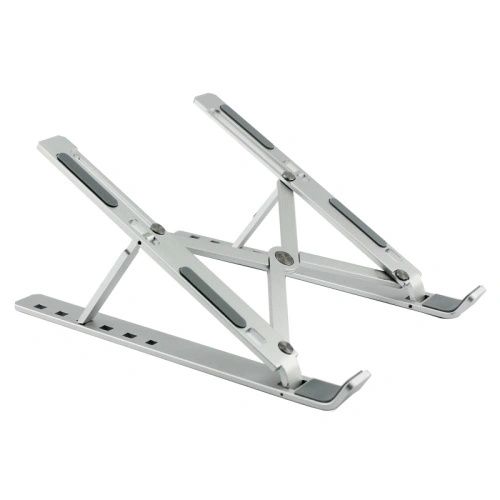
What Is a Horizontal Laptop Stand?
A horizontal laptop stand supports the laptop in an open position while raising the screen closer to eye level.It allows users to work directly on the laptop or with external accessories.
Many ergonomic laptop stands use this design because it promotes a more comfortable viewing angle.
Key Features
Raises laptop screen
Improves typing posture
Better screen visibility
Supports airflow underneath the laptop
Suitable for daily laptop use
Horizontal stands are commonly found in offices,schools,and home workspaces.
Side-by-Side Comparison
| Feature | Vertical Laptop Stand | Horizontal Laptop Stand |
|---|---|---|
| Desk Space | Excellent | Moderate |
| Laptop Position | Closed | Open |
| External Monitor Required | Recommended | Optional |
| Ergonomics | Depends on external monitor | Excellent |
| Cooling | Good side ventilation | Better bottom airflow |
| Cable Management | Clean and organized | More cables visible |
| Portability | Very compact | Slightly larger |
| Best Use | Docked workstation | Everyday laptop use |
Space Saving
If desk organization is your priority,a vertical laptop stand is the clear winner.
Because the laptop stands upright,it occupies only a small portion of the desk.This leaves more room for keyboards,notebooks,speakers,and other office accessories.
Horizontal stands require the laptop to remain open,which naturally consumes more desktop space.
Winner:Vertical Laptop Stand
Ergonomics
For users who work directly on their laptop screen,a horizontal stand provides much better ergonomics.
By raising the screen closer to eye level,it reduces neck strain and encourages a healthier sitting posture.
Vertical stands are not designed for direct laptop use.They are intended for users with an external monitor.
Winner:Horizontal Laptop Stand
Cooling Performance
Both designs improve cooling,but in different ways.
Vertical Laptop Stand
Allows airflow around both sides
Suitable for laptops running in clamshell mode
Reduces heat buildup compared to placing the laptop flat
Horizontal Laptop Stand
Elevates the laptop
Improves airflow underneath
Helps cooling fans work more efficiently
If your laptop performs heavy tasks such as video editing or gaming directly on its built-in screen,a horizontal stand generally offers better thermal performance.
Winner:Horizontal Laptop Stand
Productivity
Your workflow determines which stand improves productivity.
Vertical Laptop Stand Is Best For
Dual-monitor setups
Office workstations
Programmers
Financial professionals
Designers using large external displays
Horizontal Laptop Stand Is Best For
Students
Remote workers
Business travelers
Writers
Daily office users
Device Protection
A quality laptop stand protects your computer from scratches and accidental movement.
Premium stands typically include:
Soft silicone padding
Anti-slip base
Rounded edges
Stable aluminum construction
Vertical stands also reduce the chance of accidental spills because less surface area is exposed on the desk.
Which One Is Better for MacBook Users?
MacBook users frequently connect to external monitors through USB-C or Thunderbolt docks.
In these setups,a vertical laptop stand is often the preferred option because:
Saves desk space
Matches Apple's minimalist design
Supports closed-display mode
Keeps cables organized
For users who travel frequently and rely on the MacBook's built-in display,a foldable horizontal stand remains the more practical choice.
Which Laptop Stand Should Businesses Choose?
For companies purchasing laptop stands in bulk,the right choice depends on workplace requirements.
Choose Vertical Laptop Stands If
Employees use external monitors.
Office space is limited.
Clean desk policies are important.
Workstations remain fixed.
Choose Horizontal Laptop Stands If
Employees primarily use laptop screens.
Flexible workspaces are common.
Staff frequently move between meeting rooms.
Ergonomic improvements are the priority.
Many organizations even purchase both types for different departments.
What to Look for Before Buying
Whether choosing a vertical or horizontal model,consider the following factors:
Aluminum alloy construction for durability
Adjustable width or height
Silicone protection to prevent scratches
Stable anti-slip base
Compatibility with laptops from 11 to 17 inches
CNC-machined finish for premium quality
OEM and custom branding options for business buyers
These features help ensure long-term performance and a better user experience.
Why Aluminum Is the Preferred Material
Most premium laptop stands are manufactured from CNC-machined aluminum alloy because it offers several advantages:
Lightweight yet strong
Excellent heat dissipation
Modern appearance
Corrosion resistance
Long service life
Silicone pads are typically added to protect laptop surfaces while improving grip.
Conclusion
Both vertical and horizontal laptop stands offer valuable benefits,but they serve different purposes.
A vertical laptop stand is ideal for professionals using external monitors,offering exceptional space savings,cleaner cable management,and a modern desk setup.It is the preferred solution for offices,programmers,designers,and businesses looking to maximize workspace efficiency.
A horizontal laptop stand,on the other hand,is better suited for users who work directly on their laptop every day.It provides superior ergonomics,better screen positioning,and improved airflow,making it an excellent choice for students,remote workers,and mobile professionals.
If you're sourcing laptop stands for wholesale,OEM,or private-label projects,partnering with an experienced laptop stand manufacturer ensures consistent quality,customization options,and competitive pricing.By understanding the differences between vertical and horizontal laptop stands,you can confidently choose the solution that best fits your workspace and business needs.